Desktop visualizer — techno · trance · house

PULSE

Turn a track into a broadcast-quality 1440p visualizer video. Every frame is computed offline from the audio itself — never a dropped frame, never a capture artifact, no matter how slow the machine.

The idea

Rendered offline, frame by frame

Most visualizers play the track and screen-record the animation live — which drops frames and compresses badly. Pulse does the opposite: it analyzes the whole track first, then renders every single frame deterministically, with no clock to race against.

01 — Analyze

Read the track once

Meyda extracts spectral features — volume, bass/mid/high energy, onsets, a 32-band spectrum — while music-tempo detects BPM and beats. The result is one feature entry per output frame.

02 — Render

Step through frame by frame

An offscreen Electron window steps through the track and calls the exact same render function used in the live preview, frame after frame, at whatever resolution and fps you export at.

03 — Encode

Pipe straight into ffmpeg

Each frame's raw pixels stream directly into ffmpeg via stdin, muxed with the source audio. Output: H.264, CRF 16, up to 60fps — visually lossless, every time.

Inside Pulse

What it actually looks like

No mockups — this is the real app, mid-export, with a custom background and a layered scene running.

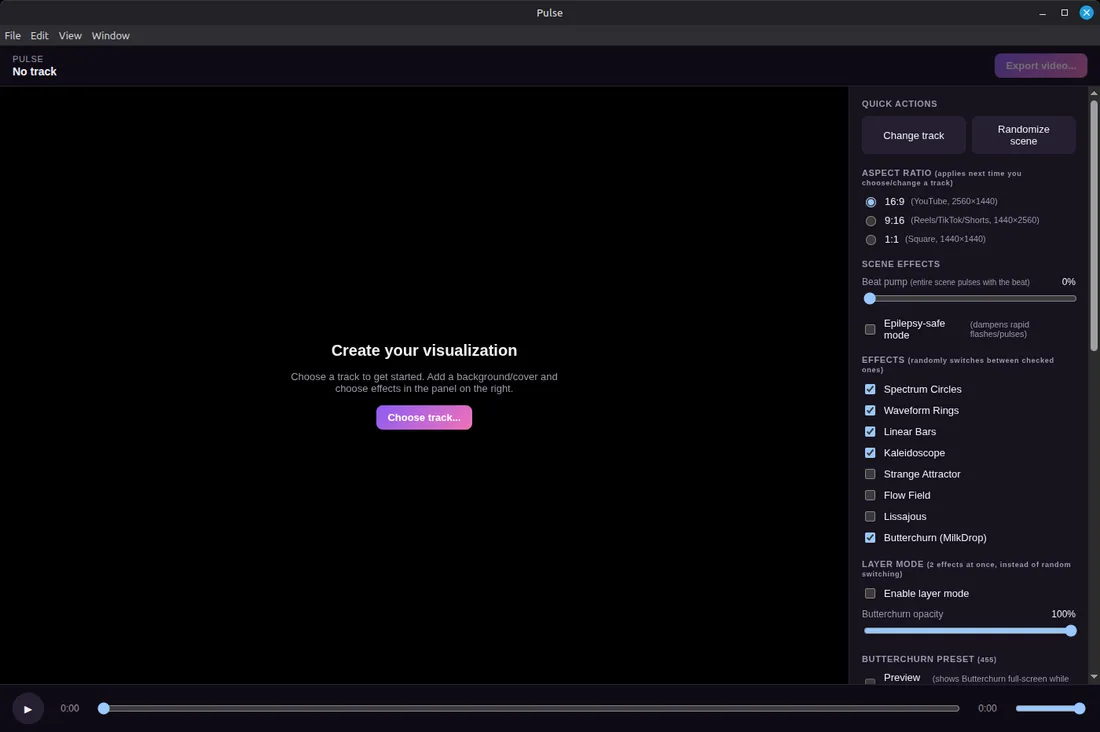
Pulse
Pulse start screen with effect checkboxes and aspect ratio options
Start herePick a track, choose an aspect ratio, and check off whichever engines you want in rotation.
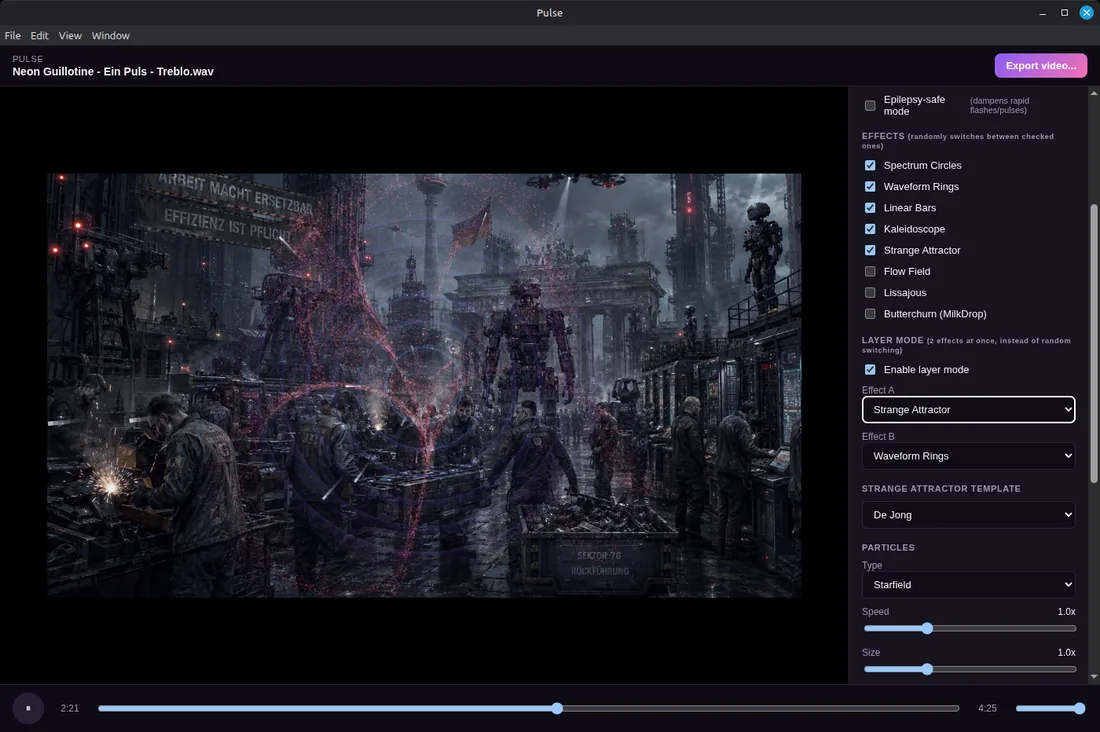
Pulse — Layer Mode
Pulse layer mode with Strange Attractor and Waveform Rings stacked over a custom background
Layer ModeStrange Attractor (De Jong) stacked over Waveform Rings, on top of a custom background — with Starfield particles.
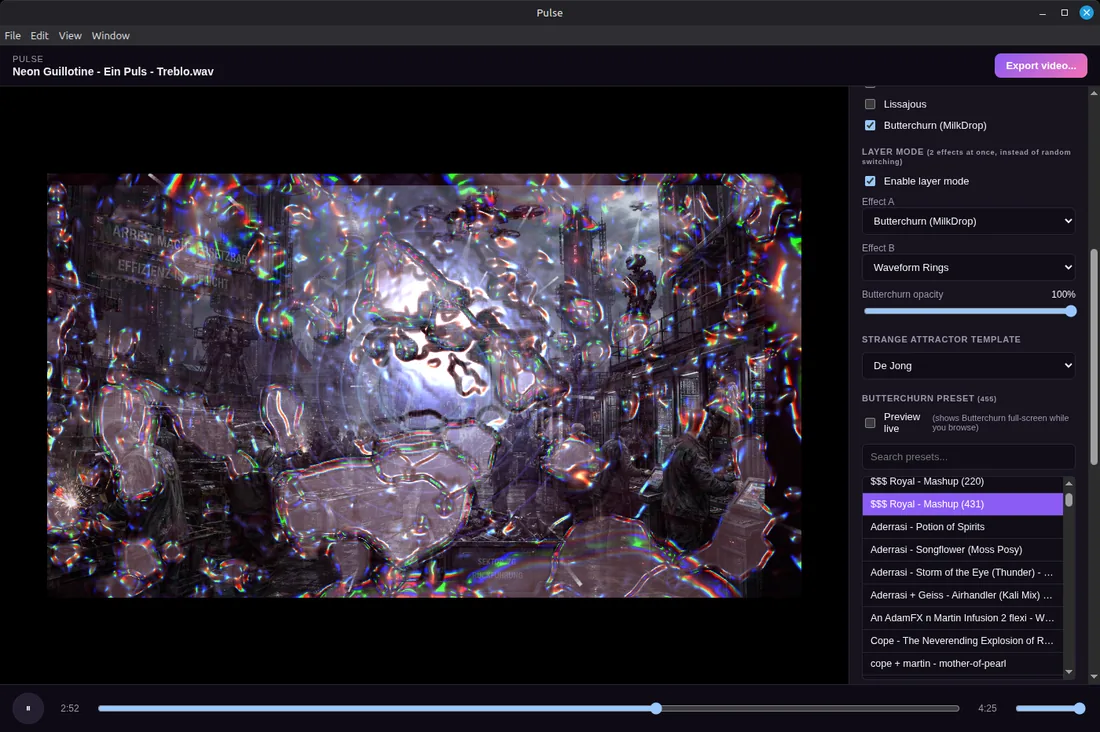
Pulse — Butterchurn presets
Pulse Butterchurn preset browser with 455 searchable presets
395+ Butterchurn presetsSearchable by name, swappable live, blended here with Waveform Rings at full opacity.
Rendering engines

Eight engines, one shared audio brain

Every engine reads from the same standardized feature stream, so they all react to the same bass, mids, highs, onsets and beats. Enable a subset and Pulse rotates between them, or lock two together as stacked layers.

Butterchurn (MilkDrop)

A WebGL port of the classic Winamp visualizer. Four bundled community preset packs — around 395 presets, searchable by name, with smooth crossfades between them.

Spectrum Circles

A circular ring of audio-reactive spectrum bars, pulsing outward with the mix.

Waveform Rings

Concentric rings — one per low/mid/high band — expanding on beats. A calmer alternative to spectrum bars.

Linear Bars

The classic mirrored equalizer layout, running across the middle of the frame.

Kaleidoscope

An 8-fold radially symmetric mandala, built from audio-reactive petal shapes.

Flow Field

Hundreds of particles drifting along a swirling turbulent field. Bass and beats pump the turbulence and speed directly — an organic wind-map feel.

Lissajous

Overlapping harmonograph curves whose frequency ratios shift with spectral-band energy, so complexity tracks the music.

Strange Attractor

Genuine deterministic chaos, plotted point by point every frame — the shape reshapes continuously as its parameters drift with the music.

Clifford De Jong Svensson Hénon Tinkerbell
Particle layers

Layered on top of any engine

Each type has adjustable speed, size and density, and automatically picks up hues from whatever's on screen — so nothing clashes.

Embers

Sparks rising with turbulence, bursting on beats. Sharp techno / industrial energy.

Bokeh

Soft, slow-drifting light orbs — a gentler, trance-style alternative.

Starfield

Points streaking outward from center, hyperspace-style, speed tied to overall energy.

Geometric Shapes

Rotating triangles and hexagons drifting upward, pulsing with the beat. Crisper house-style look.

Streaks

Short directional dashes that flash outward and fade fast on strong beats.

Artist Card

A glassmorphism now-playing panel — art, title, artist — fading in at the start and again for the outro.

Export

Built for a clean upload, not a demo reel

SettingDetail
Resolutions16:9 (2560×1440) · 9:16 (1440×2560, Reels/TikTok/Shorts) · 1:1 (1440×1440) — always rendered at full quality regardless of orientation
Frame rateUp to 60fps
VideoH.264, CRF 16 — visually lossless, yuv420p
AudioAAC 320kbps, muxed directly from the source file
Input audioWAV, MP3, FLAC, M4A, AAC, OGG
Background mediaImages: PNG, JPG, WebP · Video: MP4, MOV, WebM, MKV
BackgroundsUp to 4 images + 2 video clips, crossfading on a timer, with Ken Burns pan/zoom on stills
SafetyOne-click epilepsy-safe mode dampens flash/pulse intensity app-wide
Get it

Download Pulse

Pulse is an actively developed personal project. It's honest about where it stands — check platform support before you dive in.

  • Linux — built and tested here, works today
  • Windows — not supported out of the box yet (a few known fixes needed)
  • macOS — untested, no known blockers
Run from source instead
$ git clone <repo-url>
$ cd Visualizer
$ npm install
$ npm start
Requires Node.js (v22 tested) and ffmpeg on PATH.
// package.json scripts
npm start — full app
npm run preview — live preview only
npm run export — headless render
npm run analyze — audio analysis only
Support the project

Worth a track's worth of coffee?

Pulse is free and built in spare time. If it has earned a spot in your export pipeline, a small tip keeps development going — no obligation, ever.

Donate via PayPal
Field notes

AI news & updates

Short write-ups on AI developments worth knowing about, posted whenever something is worth flagging.

Read the blog